Sales Email AI Prompt Template for Maximum Click Rates – You want more people to open your sales emails. Then you want them to click. AI can help you do both if you give it the right prompts.
In this guide, you will find ready-to-use AI prompt templates. These templates help you write sales emails that get higher click rates. We pulled ideas from trusted sources like Salesforce, Consensus, and recent email benchmarks. The tips stay current for 2025 and 2026.
Average email open rates sit around 30 to 43 percent across industries. Click rates often land near 1.7 to 2.6 percent. Top performers do better. Good AI prompts can push your numbers higher by making every email feel personal and useful.
Why AI Prompts Matter for Sales Email Click Rates
- First, people get too many emails. The average worker sees over 100 messages each day. Your email must stand out fast.
- Next, generic copy fails. AI that just “writes a sales email” creates stiff text. Readers delete it. But a clear prompt tells the AI your buyer’s pain, your product’s benefit, and the exact action you want.
- As a result, the email becomes short, relevant, and easy to act on. Higher relevance leads to more opens. Strong calls to action lead to more clicks.
- Moreover, Salesforce notes that specific AI prompts help small businesses draft emails that drive click rates by focusing on benefits and a clear next step.
Core Elements of a High-Click Sales Email Prompt
Before you copy any template, understand what works. A strong prompt usually includes these parts:
- Role for the AI ChatGPT or others (for example, “act as a top B2B sales copywriter”)
- Buyer details (name, company, role, pain point)
- Product details and one clear benefit
- Desired length (under 130 words works well)
- Tone (conversational, no exclamation points)
- Subject line request
- One simple call to action
Then add constraints. Tell the AI to avoid spam words and keep sentences short. This keeps the reading easy and the score high on tools that check Flesch Reading Ease.
Ready-to-Use AI Prompt Template for Maximum Click Rates
Here is a complete template you can copy and paste. Fill in the brackets with your details.
Main Prompt Template:
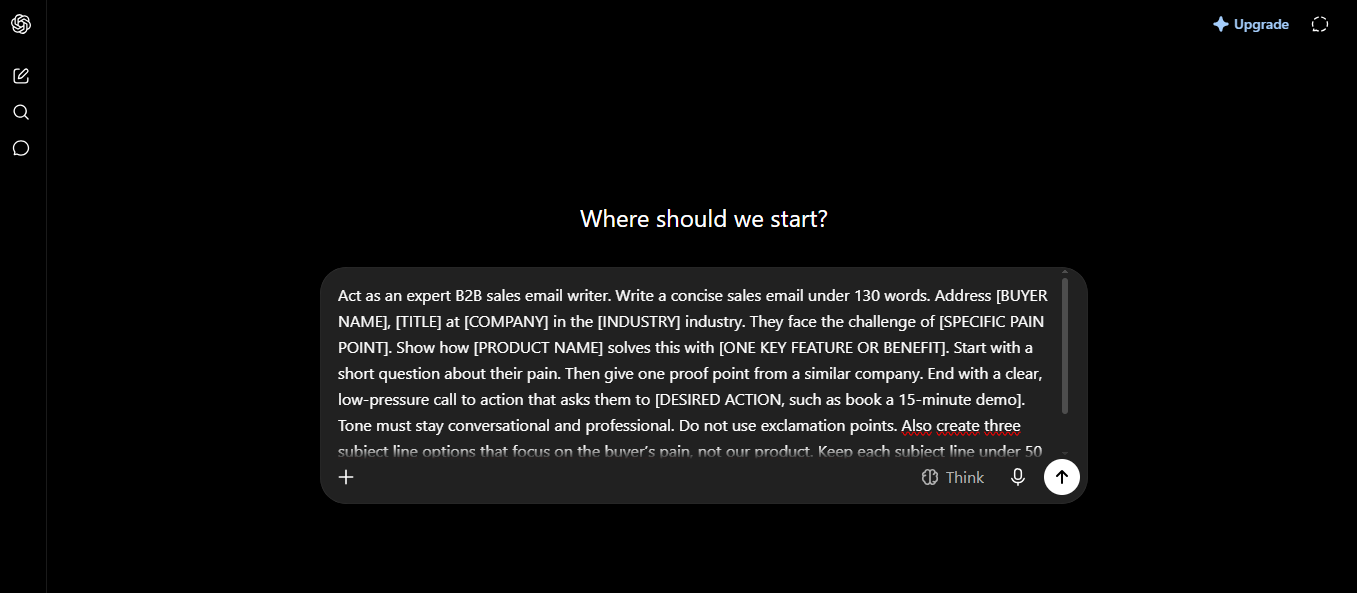
“Act as an expert B2B sales email writer. Write a concise sales email under 130 words. Address [BUYER NAME], [TITLE] at [COMPANY] in the [INDUSTRY] industry. They face the challenge of [SPECIFIC PAIN POINT]. Show how [PRODUCT NAME] solves this with [ONE KEY FEATURE OR BENEFIT]. Start with a short question about their pain. Then give one proof point from a similar company. End with a clear, low-pressure call to action that asks them to [DESIRED ACTION, such as book a 15-minute demo]. Tone must stay conversational and professional. Do not use exclamation points. Also create three subject line options that focus on the buyer’s pain, not our product. Keep each subject line under 50 characters.”
This template works because it forces personalization, length control, and a direct ask. Consensus shares a similar structure that ties the product feature straight to the buyer’s pain and ends with a clear CTA.
How to Customize the Template for Different Stages
Cold outreach needs a different feel than a follow-up. So adjust the prompt.
For cold emails:
Add this line: “Reference one public detail about the company or recent news if available. Make the first sentence a question that shows research.”
For follow-ups:
Change the start: “Write a short follow-up that offers one useful tip related to [PAIN POINT] instead of just checking in.”
SparrowGenie tested prompts like these and saw open rates jump past industry averages when the email stayed under 130 words and avoided hype.
For decision-makers:
Add: “Focus on ROI and time saved. Keep the tone confident and respectful of their busy schedule.”
Extra Prompt Variations That Boost Clicks
You can also ask the AI for subject lines alone. Strong subject lines drive opens, and opens lead to clicks.
Subject Line Prompt:
Create five attention-grabbing email subject lines focused on [PRODUCT FEATURE or PAIN POINT] for a cold outreach email. Keep each under 50 characters. Use a curiosity hook. Do not use the words “quick,” “question,” or “free.”
Then test them. A/B testing remains one of the best ways to raise click rates over time.
Another useful prompt comes from Salesforce:
“Draft a sales email to [target customer] highlighting the benefits of our [product] and encouraging them to schedule a demo.”
This simple version still produces solid results when you add more buyer context.
Best Practices That Raise Click Rates Even Higher
- Always review the AI output. AI gives a strong first draft. You add the final human touch.
- Keep the email scannable. Use short paragraphs. Place the call to action near the end but make it stand out.
- Link only to one clear destination. Too many links lower clicks. One strong CTA works better.
- Personalize beyond the first name. Mention a real pain or a recent company event. This raises trust and action.
- Track results. Watch open rates, click rates, and reply rates. Then refine the prompt based on what wins.
- Recent benchmarks show average click rates around 1.7 to 2.6 percent for campaigns. Automated and highly relevant emails can reach higher. Your AI prompts help you join the top performers.
Common Mistakes to Avoid
- Do not give vague prompts. “Write a good sales email” produces weak copy.
- Do not let the AI sound salesy. Ban phrases like “I hope this finds you well” or heavy hype.
- Do not ignore mobile. Most people open email on phones. Short sentences and clear CTAs help.
- Do not skip testing. Even the best prompt needs real-world checks.
Putting It All Together: A Full Example
Imagine you sell a CRM tool. Your buyer is a sales manager who struggles with slow follow-ups.
You paste the main template and fill the blanks. The AI returns something like this:
Subject options:
“Still chasing leads after calls?”
“Follow-up time eating your day?”
“How teams cut admin by half”
Body:
Hi Jordan,
Do long follow-up lists slow your team down each week?
Many sales managers face the same issue. Our CRM tracks every reply and suggests the next step automatically. Teams like yours often save several hours each week.
Would you be open to a short 15-minute walk-through next week to see if it fits?
Best,
Alex
This email is short. It starts with the pain. It offers proof. It ends with an easy yes. That structure supports higher click rates.
Final Tips for Long-Term Success
- Start with the main template today. Run it on your next ten prospects. Measure the clicks.
- Then create a small library of prompts for cold, follow-up, and closing stages. Share them with your team.
- Update the prompts as buyer needs change. AI tools improve, and so should your instructions.
- In short, the right AI prompt turns generic outreach into targeted messages that people actually click. Use the template above. Add your details. Test and refine. Your click rates can rise as a result.
- You now have a clear, practical system. Apply it and watch more people move from open to click to conversation.