7 Best Free AI Video Generators Without Watermark in 2026 – Creating professional AI videos no longer requires expensive subscriptions or accepting branded watermarks that ruin the final look. In 2026, several platforms offer genuinely usable free tiers that export clean videos—ideal for social media, marketing tests, personal projects, or prototyping.
“Free” still usually means limits on duration, resolution, daily/monthly generations, or commercial rights. Policies change, so always verify current terms before publishing. Below are seven of the strongest free (or freemium) options that multiple independent tests and reviews highlight for watermark-free or clean exports in 2026, based on hands-on evaluations of quality, limits, ease of use, and output usability.
How We Selected These Tools
We prioritized tools with:
- Free-tier access that allows export without a visible watermark (or with only minimal/invisible marking in some cases).
- Usable output quality for short-form content (TikTok, Reels, Shorts, ads).
- Reasonable generation limits and features like text-to-video or image-to-video.
- Positive recent testing data from mid-2026 reviews.
Watermark policies can vary by region, account type, or update, so download and inspect a test clip yourself.
1. CapCut – Best Overall Free Option for Social Creators
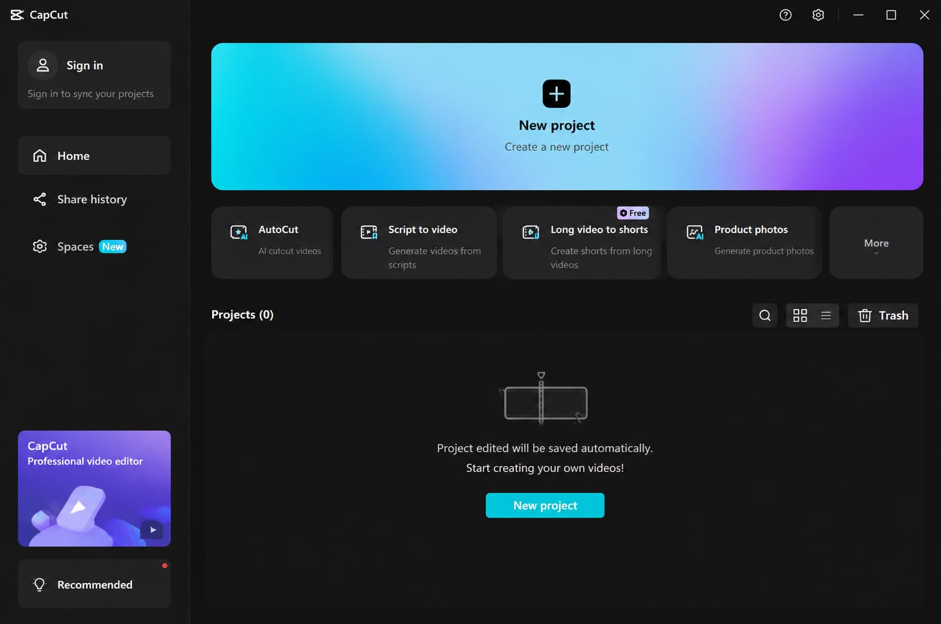
CapCut (by ByteDance) stands out as one of the most practical free tools. Its desktop app lets users export AI-generated or edited videos without a watermark on the free plan, often up to 4K.
Key free features: Built-in AI text-to-video and effects, massive template library optimized for TikTok/Reels/Shorts, auto-captions, background removal, and a full editor. Generation is fast for social clips.
Limitations: AI generation quality sits below top pure models like Veo for cinematic work. Web version has more restrictions than desktop. Some enterprise users note data-privacy considerations due to ownership.
Best for: Short-form social content creators who need generation + editing in one place. Ideal starting point for most users in 2026.
2. Google Veo 3 (via AI Studio / Gemini) – Best Free Quality
Google’s Veo 3 delivers some of the highest visual fidelity available in free generative video—natural motion, physics, lighting, and native audio generation. Access comes through Google AI Studio or related free pathways with rate limits rather than strict one-time credits.
Key free features: Cinematic output, synchronized audio, strong prompt adherence for complex scenes. Clips often reach 8 seconds or more at solid resolution.
Limitations: No built-in full editor or avatars. Free access is rate-limited or capped (reports of ~10 generations/month in some channels). Watermark status has varied by tier and region in 2026 updates—many free/Pro outputs include a visible mark, while higher tiers remove it.
Best for: Creators prioritizing photorealistic or cinematic B-roll over volume or full production tools.
3. Pika – Best for Quick Creative Effects and Social Clips
Pika remains popular for its simple interface and creative tools (object manipulation, style effects, extensions). Multiple 2026 reviews list it among tools that export free clips without watermarks.
Key free features: Text-to-video and image-to-video, short high-quality clips (often up to 4 seconds), easy iteration, and effects library. Free credits or monthly allowances are common.
Limitations: Short maximum duration. Limited free volume. No native audio in many free uses.
Best for: Fast social experiments, stylized content, and beginners who want zero learning curve.
4. Seedance 2.0 – Best for Speed and Daily Volume
ByteDance’s Seedance 2.0 (often accessible via CapCut or related interfaces) impressed testers with generation speeds around 30 seconds and solid visual quality. Free tiers frequently offer daily refreshing credits and clean exports.
Key free features: Fast text- and image-to-video, good motion, 1080p potential, and relatively generous daily allowances (reports of high credit refreshes).
Limitations: Free limits may tighten over time as the model matures. Quality is strong but generally trails peak Veo results. Interface and licensing details can evolve.
Best for: Creators who iterate heavily on prompts or need volume for social batches.
5. Kling AI (Kling 3.0) – Best for Human Motion and Consistency
Kling (from Kuaishou) excels at realistic body physics, facial consistency, and human movement—areas where many models still struggle. Free tiers provide recurring credits or daily generations, and several reviews note no watermark on free exports.
Key free features: Strong character handling, up to ~5–10 second clips, solid resolution on free plans.
Limitations: Credit burn can be quick at higher quality. Support and data policies draw mixed feedback. Non-human scenes are less impressive.
Best for: UGC-style content, talking or moving people, and product demos featuring humans.
6. Canva (Free Plan) – Best for Design-Integrated Video
Canva’s free plan includes AI video tools plus its massive template and design library. Basic exports are often clean, making it practical for branded social posts.
Key free features: Easy templates, text-to-video elements, animations, brand kit basics, and seamless graphic integration.
Limitations: AI generation is lighter than dedicated models. Some advanced AI features or higher-quality exports push toward paid plans.
Best for: Marketers and designers who want polished, on-brand short videos without leaving a familiar design platform.
7. Clipchamp (Microsoft) – Best Free Windows/Microsoft Option
Microsoft’s Clipchamp offers free video creation and basic AI features with watermark-free exports on the free tier, especially convenient for Windows users.
Key free features: Templates, stock media, simple AI tools, cloud sync, and straightforward export.
Limitations: Less advanced pure generative AI compared with Veo, Kling, or Seedance. Feature depth is more editing-focused.
Best for: Windows users, beginners, and those already in the Microsoft ecosystem needing clean exports quickly.
Quick Comparison Table (2026 Free Tiers)
| Tool | Approx. Free Limits | Watermark on Free | Strength | Best For |
|---|---|---|---|---|
| CapCut | Strong desktop access, templates | No (desktop) | Editing + generation | Social clips |
| Google Veo 3 | Rate-limited / monthly caps | Varies (often yes on free) | Highest quality | Cinematic B-roll |
| Pika | Limited monthly / credits | Generally no | Effects & simplicity | Quick social tests |
| Seedance 2.0 | Daily credits | Generally no | Speed & volume | Iteration |
| Kling 3.0 | Daily/recurring credits | Generally no | Human motion | People-focused content |
| Canva | Free plan limits | Usually clean on basic | Design integration | Branded posts |
| Clipchamp | Free Microsoft tier | No | Ease of use | Windows users |
(Data synthesized from 2026 reviews; exact numbers fluctuate.)
How to Choose and Tips for Success
- Need speed + social templates? Start with CapCut or Seedance.
- Want peak realism? Prioritize Veo 3 (and accept potential limits/watermarks).
- Focus on people? Kling.
- Prefer design + video? Canva.
- Always test a prompt, download the file, and check for watermarks, resolution, and commercial-use terms.
- Combine tools: generate in one, edit/polish in CapCut or Canva.
- Write detailed prompts (camera angle, lighting, motion, style) for better results.
- Free tiers are excellent for testing and personal use; serious commercial or high-volume work usually benefits from paid upgrades.
Frequently Asked Questions
Which free AI video generator truly has no watermark in 2026?
CapCut’s desktop free exports are among the most consistently reported as clean. Pika, Seedance, and Kling also frequently appear on no-watermark lists, while pure generative leaders like Veo often apply marks on free tiers.
Can I use free AI videos commercially?
It depends on each platform’s terms. Many free tiers restrict commercial rights or require paid plans for full licensing. Always read the current ToS.
Are open-source options better for unlimited free use?
Models such as WAN (self-hosted) can offer unlimited local generation without watermarks if you have suitable GPU hardware, but they require technical setup.
Will free limits stay this generous?
History shows free tiers often tighten as models mature and costs rise. Enjoy current allowances while they last.
In 2026 the free AI video landscape is more capable than ever. CapCut offers the most practical everyday workflow for most creators, while Veo, Seedance, Kling, and Pika cover quality, speed, motion, and creativity. Start with one or two that match your content style, generate a few test clips, and refine from there. Clean, usable AI video is now accessible without a credit card—just be realistic about volume and always double-check the latest export rules.