AI Video Generators Guide for Faceless YouTube in 2026 – Faceless YouTube channels keep growing fast in 2026. Many creators now make money without ever showing their face. They use AI video generators to build videos quickly. These tools turn text or simple prompts into ready-to-upload clips. As a result, you save time and scale your channel easily.
This guide shows you the best AI video generators for faceless YouTube right now. It also covers how to pick the right one and start strong. You will find clear steps and current options from trusted tests.
Why Faceless YouTube Works So Well with AI
First, faceless channels remove the need for cameras or on-screen presence. Next, AI handles scripts, voiceovers, visuals, and editing. Therefore, one person can post often without burnout.
In addition, AI tools now create realistic motion, natural voices, and solid B-roll. For example, models like Google Veo 3.1 deliver cinematic clips with matching audio. Meanwhile, platforms such as HeyGen and InVideo AI assemble full videos from a single prompt. As a result, production that once took days now finishes in minutes.
Moreover, YouTube still rewards consistent uploads. Consequently, AI helps you stay regular and test more niches.
Top AI Video Generators for Faceless YouTube in 2026
Several tools stand out this year based on recent reviews and hands-on tests.
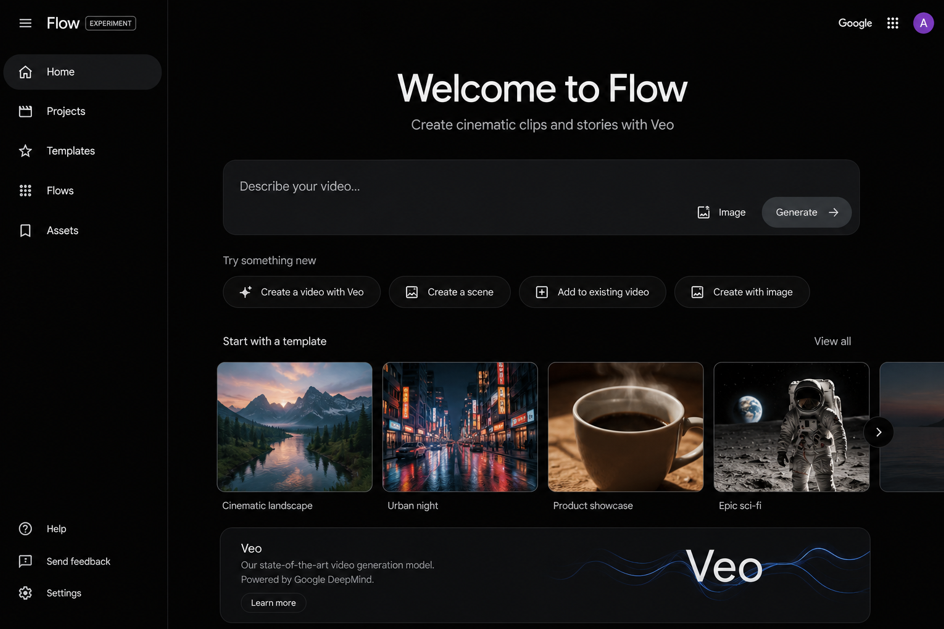
Google Veo (via Flow or AI Studio) ranks high for quality. It follows prompts closely and adds native audio. You can start with text, images, or reference frames. The output looks realistic and works well for B-roll or full scenes. Free credits exist daily, while paid plans remove watermarks and raise limits.
HeyGen leads for full automation. Its Video Agent turns one prompt into a finished video with script, voice, captions, and B-roll from models like Sora 2 or Veo. It offers over 1,100 avatars and 175+ languages. Voice cloning stays consistent across videos. The free plan allows a few videos each month. Paid plans start around $24 monthly for unlimited use. Many faceless creators use it for explainers and story content.
InVideo AI combines generative models with stock footage. It includes access to Sora 2 and Veo 3.1 inside one subscription. Type a prompt and get a narrated video with captions and music. It supports both Shorts and long-form formats. The Plus plan costs about $25 per month. Editing happens through simple text commands.
Pictory shines at turning blogs or scripts into videos. Paste a URL or text and it matches stock clips, adds captions, and narrates. It works fast for repurposing written content. Plans start near $25 monthly. However, it relies more on stock than pure generative video.
Other strong options include Runway for cinematic control, CapCut for free watermark-free Shorts editing, and tools like Faceless.so or AutoShorts.ai for heavy automation of short-form posts.
Furthermore, pair any of these with ElevenLabs for top-tier voiceovers when needed.
How to Choose the Right Tool for Your Channel
- Start by listing your main needs. Do you want pure generative clips or full automated videos? Next, check aspect ratios. Most tools now handle 9:16 Shorts and 16:9 long videos.
- Also, look at pricing versus volume. Free tiers help you test. However, watermarks or low resolution limit monetized channels. Therefore, budget for a paid plan once you publish regularly.
- In addition, test voice quality and visual consistency. Play sample outputs on phone and desktop. Moreover, check language support if you aim for global viewers.
- Finally, consider ease of use. Beginners prefer prompt-to-video platforms. Advanced users may like more control in Runway or similar tools.
Simple Workflow to Launch Your Faceless Channel
Follow these steps for smooth results.
- First, pick a niche with steady demand such as finance tips, science facts, or story summaries. Research with tools that suggest titles and topics.
- Next, write or generate a script. Use ChatGPT or Claude for strong hooks and clear structure. Keep sentences short for better AI narration.
- Then, choose your AI video generator. Enter the script or a detailed prompt. Select voice, style, and length. Generate the first draft.
- After that, review and edit lightly. Swap weak scenes, fix captions, or adjust pacing. Most platforms let you do this with simple clicks or text commands.
- Finally, add music from free libraries, export in high quality, and upload. Optimize the title, description, and thumbnail for search.
As a result, you can produce videos in under an hour once the process becomes familiar. Over time, automate more parts for daily posting.
Tips for Better Results and Higher Retention
Always mix AI visuals with clear storytelling. Pure stock or generic clips can feel flat. Therefore, use generative models for unique scenes when possible.
In addition, keep voices natural. Test different tones and add slight pauses. Viewers stay longer with engaging narration.
Moreover, focus on Shorts first for faster growth. Then expand to longer videos once you gain traction.
Also, stay consistent with branding. Use the same voice or visual style across videos. This builds recognition without a real face.
Furthermore, monitor analytics. See which topics hold attention and make more of those. Adjust your prompts based on real performance.
Finally, respect platform rules and disclose AI use when required. Clean practices protect your channel long term.
Common Mistakes to Avoid
Do not rely only on free tiers with watermarks for monetized content. Viewers notice them quickly. Next, avoid overly long or complex prompts that confuse the AI. Instead, break videos into shorter scenes.
Also, skip publishing without reviewing the output. Small fixes improve retention a lot. In addition, do not ignore copyright on music or stock elements. Stick to licensed or royalty-free options.
Looking Ahead in 2026 and Beyond
AI video quality keeps rising. Models now handle better motion, consistent characters, and native sound. Meanwhile, more tools offer end-to-end automation including scheduling.
As a result, barriers to entry stay low. However, competition grows too. Therefore, strong ideas, good hooks, and regular posting still matter most.
Creators who combine smart research with these generators gain the biggest edge. They test faster and improve based on data.
Start Creating Today
You now have a clear map of the best AI video generators for faceless YouTube in 2026. Pick one tool that matches your budget and goals. Then follow the simple workflow above.
Begin with a short test video this week. Refine your process and post consistently. Over time, your channel can grow without camera pressure or heavy editing.
The tools are ready. Your ideas can reach viewers worldwide. Take the first step and build from there.