Edutainment Workflow: Transform Script into AI Videos in 2026 – Creating educational content that also entertains has never been easier. In 2026, AI tools let anyone turn a plain script into polished videos in minutes instead of days. This edutainment approach blends learning with storytelling so viewers stay engaged longer and remember more. Moreover, the process works for teachers, course creators, marketers, and YouTubers alike. Consequently, more people can share knowledge without big budgets or film crews.
Why Edutainment Matters Now
Edutainment combines education and entertainment. Traditional lectures often bore viewers, while pure entertainment rarely teaches lasting skills. AI-generated videos solve both problems. They deliver clear explanations with visuals, avatars, music, and captions that feel modern and fun.
Research supports the shift. According to a 2026 trends report, AI video tools cut course production time from over 80 hours to under 5 hours. In addition, 67 percent of educators say these tools save them more than 10 hours each week. Meanwhile, adaptive systems that include such videos show learning outcome gains of around 42 percent in some studies. As a result, institutions and independent creators now treat AI video as standard practice rather than an experiment.
The Core Edutainment Workflow in 2026
The workflow stays simple yet powerful. Follow these clear steps and you can move from idea to finished video quickly.
First, write or refine your script. Keep sentences short and active. Focus on one main idea per section. Add questions, stories, or analogies that spark curiosity. Tools such as AI writing assistants can help expand an outline into a full script, yet human review remains essential for accuracy and tone.
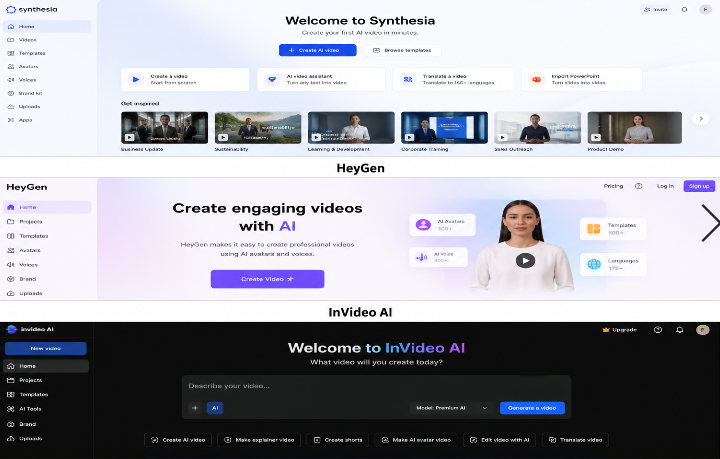
Next, choose the right AI platform based on your goal. For talking-head or avatar-led explainers, platforms like Synthesia and HeyGen excel. You paste the script, pick a realistic digital presenter, select a voice and language, and generate the video. These tools support over 160 languages and offer hundreds of avatars, making localization fast.
For fuller productions that mix stock footage, AI-generated clips, voiceover, and captions, InVideo AI stands out. Type a prompt or upload your script and the system assembles a complete video with visuals, music, and editing already applied. Meanwhile, creative teams often combine tools: they generate cinematic B-roll in Runway, Kling, Seedance, or Veo models and then insert those clips into avatar videos.
After generation, refine the output. Most platforms let you edit text, swap scenes, adjust timing, or regenerate weak sections. Add captions for accessibility and SEO. Finally, export in the right format—horizontal for YouTube, vertical for Shorts or TikTok—and publish. The entire pipeline can finish in under 30 minutes for a short video and a few hours for longer modules.
Read more : How to Automate TikTok, Shorts & Reels With AI (2026)
Best AI Tools for Script-to-Video in 2026
Several platforms lead the market this year.
Synthesia remains a top choice for professional training and education. It turns scripts into studio-quality avatar videos and integrates with generative models for extra visuals. Companies use it heavily for compliance and onboarding because the results look polished and consistent.
HeyGen offers similar avatar strengths plus strong translation and voice-cloning features. Educators report saving more than 15 hours per week while reaching large student audiences.
InVideo AI shines for speed and volume. Creators feed it a script or simple prompt and receive a finished marketing or explainer video complete with stock and AI assets. It works especially well for social content.
For pure generative clips, models such as Seedance 2.5, Veo, Kling, and Runway Gen series deliver longer, more controllable footage—up to 30 seconds at high resolution with better physics, lip sync, and style consistency. Platforms now integrate these models, so users gain cinematic options without leaving a single interface.
Pictory and similar tools help when you start from existing articles or webinars. They convert text into video sequences automatically. In short, the best workflow often mixes one avatar tool with one generative model and a light editing pass.
Practical Benefits You Can Expect
Time savings rank as the biggest win. One detailed pipeline example shows a full machine-learning module—script, voice, animations, captions, and quiz—completed in about 17 minutes versus 40–140 traditional hours. That represents roughly 140 times faster production.
Cost drops sharply too. You avoid studios, actors, and editors for many projects. Multi-language versions become nearly free once the base video exists. Accessibility improves because captions, transcripts, and adjustable pacing come built-in.
Engagement rises as well. Viewers prefer short, visually rich segments over long static lectures. Personalization options let creators generate variations for different learner levels or interests. Furthermore, consistent characters and styles across a series build brand recognition and learner comfort.
Tips for High-Quality Results
Start with a strong script. Clear structure and conversational language produce better AI output. Specify visual cues in the script when possible—“show a simple diagram of the water cycle” or “cut to an animated timeline.”
Test multiple tools on the same short script. Compare realism, lip sync, motion stability, and audio quality. Choose the one that matches your audience’s expectations.
Always fact-check. AI can introduce small errors, so subject-matter experts should review final videos. Add human touches such as custom intros, real examples, or interactive questions to keep the content authentic.
Optimize for platforms. Include keywords in titles, descriptions, and spoken dialogue. Add chapters and end screens on YouTube. Vertical formats with bold captions perform better on short-form apps.
Finally, measure results. Track watch time, completion rates, and quiz scores. Use the data to refine future scripts and prompts.
Looking Ahead
By late 2026, expect even tighter integration. Multimodal systems will accept a script plus reference images or previous clips and maintain character consistency across longer videos. Real-time generation and interactive elements—where viewers pause and ask the avatar questions—will expand. Immersive formats that feed into AR or VR environments are also advancing.
At the same time, responsible use grows more important. Creators must label AI content clearly, protect learner data, and avoid over-reliance that reduces original teaching skill. Balanced human-AI collaboration delivers the best outcomes.
Start Your Own Workflow Today
Transforming a script into an AI video no longer requires technical expertise or large teams. Choose a platform that fits your needs, prepare a clear script, generate, refine, and publish. The tools available in 2026 make professional edutainment accessible to almost anyone.
Begin with a short five-minute explainer on a topic you know well. Iterate quickly. Before long you will produce series of engaging videos that educate and entertain at the same time. The opportunity is open now—seize it and share knowledge in the format modern audiences prefer.