7 Best AI Tools for Students to Write Papers 10x Faster 2026 – Students face tight deadlines and heavy workloads. Writing papers takes time. Research, outlines, drafts, and edits can drag on for days. Luckily, AI tools change that. In 2026, the right tools help you research faster, draft clearer text, and polish work in minutes. As a result, many students finish papers up to 10 times faster while keeping their own voice.
However, AI works best as a helper, not a replacement. Always check school rules. Cite sources properly. Edit everything yourself. This way, you learn more and avoid problems. Below, you will find seven trusted tools. Each one stands out for academic writing in 2026. Sources include recent reviews from Paperpal, academic blogs, and tool sites updated through mid-2026.
1. ChatGPT
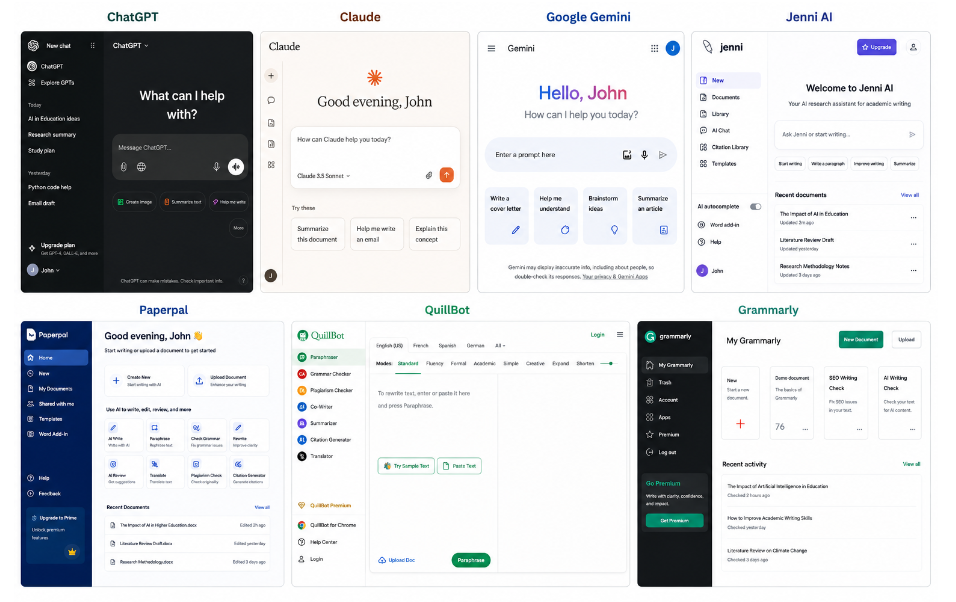
ChatGPT remains a top choice for most students. It brainstorms ideas, builds outlines, and drafts full sections quickly. Moreover, the latest models handle long prompts well. You can paste notes or ask for explanations in simple words.
For example, type your topic and request a structured outline with thesis ideas. Then, expand each point. In addition, it rewrites awkward sentences on command. Free users get solid access. Paid plans unlock stronger models and higher limits. Consequently, many students start every paper here. It speeds up the blank-page stage the most.
2. Claude
Claude shines at long-form writing and clear reasoning. Its large context window lets you upload full papers or long notes. Then, it reviews arguments, spots weak points, and suggests better flow. Furthermore, the prose often sounds natural and academic.
Students use Claude for essay feedback. Ask it to grade your draft against a rubric. Or request help tightening a thesis. In 2026 reviews, Claude often ranks high for nuanced academic text. Therefore, pair it with ChatGPT. One generates ideas. The other refines them. This combo cuts revision time sharply.
3. Google Gemini
Gemini works best if you already use Google tools. It connects to Docs, Drive, and Search. As a result, you research and write in one place. Upload PDFs or notes. Then, ask for summaries or citation help.
Moreover, Gemini handles multimodal tasks. You can share screenshots of sources. It also offers a strong free tier. For students in the Google ecosystem, this tool removes friction. Consequently, research and drafting happen faster. Many 2026 comparisons note its solid all-around performance for schoolwork.
4. Jenni AI
Jenni AI focuses purely on academic writing. It offers real-time autocomplete that matches scholarly tone. In addition, it suggests citations from your uploaded papers or web sources. You write a sentence. It continues in the right style.
The outline builder and library features help organize research. Then, you draft with AI support that stays grounded in your sources. Reviews from 2026 call it a strong pick for students and researchers who need cited work. Therefore, it reduces the time spent hunting references and fighting writer’s block.
5. Paperpal
Paperpal targets academic language and editing. It checks grammar with a scholarly focus. Furthermore, it offers real-time suggestions tailored to research papers and essays. Students use it to polish drafts before submission.
It also helps with paraphrasing and submission readiness. Compared to general tools, Paperpal understands academic context better in many tests. As a result, your writing stays precise and formal. Pricing includes student-friendly options. In short, it turns rough drafts into cleaner papers quickly.
6. QuillBot
QuillBot excels at paraphrasing and clarity. Paste a dense paragraph. Choose a mode. It rewrites while keeping meaning. Moreover, it includes grammar checks, summarizers, and a citation generator.
Students rely on it to improve fluency and avoid repetitive wording. The free plan covers basic needs. Premium unlocks more modes and higher limits. Consequently, editing becomes faster and less stressful. Many academic writing guides still list QuillBot as a core tool in 2026.
7. Grammarly
Grammarly catches errors and improves tone in real time. It works inside browsers, Google Docs, and Word. In addition, newer AI features help with rewrites, tone shifts, and even basic generation under student guidelines.
Millions of students use it daily. Schools often recommend it. Therefore, it serves as the final polish step. Free users get strong grammar help. Premium adds advanced suggestions. Pair it with any drafting tool above. Your paper becomes clearer and more professional in minutes.
How These Tools Help You Write 10x Faster
First, use ChatGPT, Claude, or Gemini for research and outlines. Next, draft with Jenni or the same chat tools. Then, refine language with QuillBot or Paperpal. Finally, run Grammarly for a last check. This pipeline removes bottlenecks.
Moreover, always fact-check AI output. Verify every claim and citation. Add your own analysis and examples. Schools care about originality. Tools that support proper citation, like Jenni and QuillBot, make ethical use easier.
In addition, start free. Test two or three tools on a short assignment. See which fit your style. Most offer free tiers or trials. As a result, you spend little money while learning what works.
Quick Tips for Best Results
- Write clear prompts. Tell the AI your level, subject, and goals.
- Break big tasks into steps. Outline first. Draft section by section.
- Edit heavily. AI gives a strong start. Your voice finishes the job.
- Track sources carefully. Never submit unedited AI text as your own.
- Combine tools. No single one does everything perfectly.
Final Thoughts
In 2026, these seven AI tools give students real speed advantages. ChatGPT and Claude handle big thinking and drafting. Gemini fits Google users. Jenni and Paperpal focus on academic needs. QuillBot and Grammarly polish the final product. Together, they can cut writing time dramatically.
However, success still depends on you. Use the tools to learn faster and write better. Stay ethical. Check your work. Then, you gain both higher grades and stronger skills. Start with one tool today. Pick a current assignment. Watch how much faster the process becomes. Your next paper does not have to take forever.