
Save Hours Every Week: Create a Weekly Meal Plan Using ChatGPT– Do you spend too much time deciding what to cook? Many people do. As a result, they waste hours each week on last-minute choices or takeout. However, you can change that. With ChatGPT, you can build a solid weekly meal plan in minutes. Therefore, you free up time for other things. In addition, you often save money and reduce stress.
Meal planning helps in clear ways. First, it cuts decision fatigue. Next, it limits food waste. Furthermore, studies link it to better diet quality. For example, research shows meal planners tend to eat more varied and healthier foods. Also, planning ahead often means fewer grocery trips and less money spent on impulse buys.
ChatGPT makes the process faster and more personal. You tell it your needs. Then it creates a plan that fits. As a result, what once took an hour can drop to just a few minutes.
Why ChatGPT Works Well for Meal Plans
ChatGPT handles many details at once. You can list diet rules, time limits, family size, and likes. After that, it builds a full week of ideas. Moreover, it can add a grocery list. In addition, you can ask for changes right away.
However, it works best when you give clear instructions. Vague requests lead to generic results. Therefore, specific prompts produce better plans. Current guides from 2025 and 2026 stress this point.
Step 1: Gather Your Details
Before you open ChatGPT, collect a few facts. First, note how many people you cook for. Next, list any allergies or diet rules. Also, write down time limits for cooking. For example, many people want weeknight meals under 30 minutes. Furthermore, mention tools you have, such as an Instant Pot or air fryer. Finally, note preferred flavors or foods to avoid.
This step takes only a couple of minutes. Yet it makes the output much stronger. As a result, the plan feels tailored to you.
Step 2: Use a Clear Prompt
A strong prompt acts like a brief for a helper. Start with the basics. Then add constraints. Here is a simple starting prompt that many people use successfully:
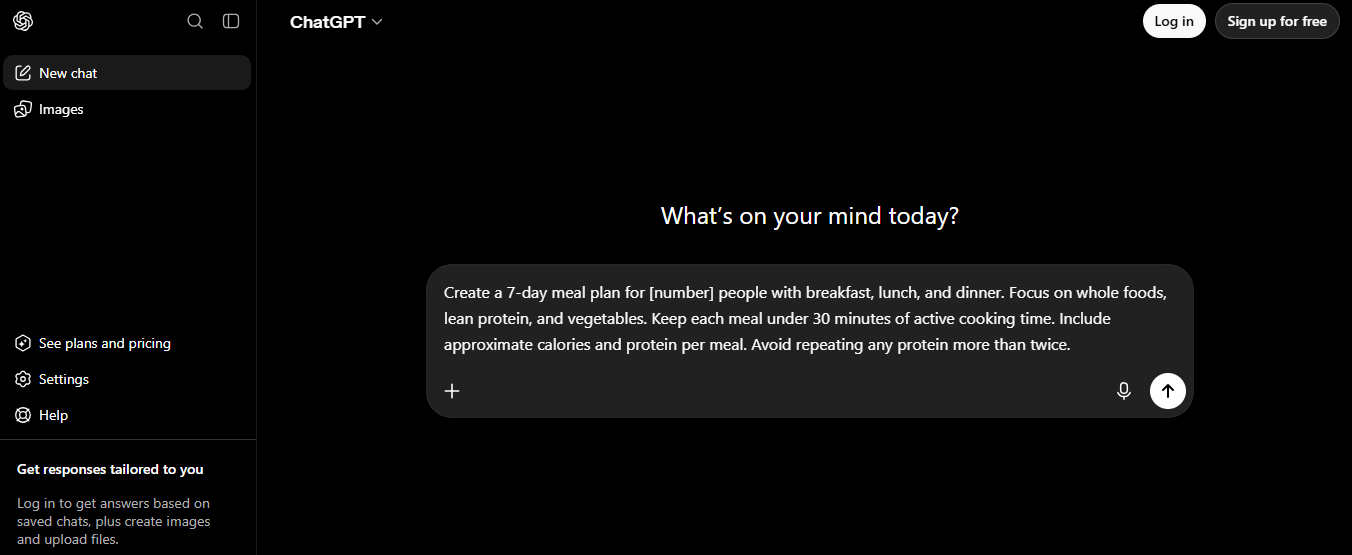
“Create a 7-day meal plan for [number] people with breakfast, lunch, and dinner. Focus on whole foods, lean protein, and vegetables. Keep each meal under 30 minutes of active cooking time. Include approximate calories and protein per meal.”
You can make it stronger. For instance, add: “Avoid repeating any protein more than twice. Prioritize seasonal produce for [current month].”
Another useful version focuses on dinners only:
“Plan five days of dinners for two people. After listing the meals, create a grocery list grouped by store sections such as produce, protein, and pantry items.”
For tighter control, try a more detailed template:
“I need [number] dinner recipes for [number] people. Total cost of ingredients should stay under $[amount]. Do not use more than [number] ingredients per recipe. Each recipe should share ingredients with others. Recipes should take less than [number] minutes. Do not include [list of foods]. Maximize protein and fiber. Include short cooking steps and a shopping list grouped by category.”
Copy one of these. Then fill in your details. After that, paste it into ChatGPT.
Step 3: Review and Adjust the Plan
ChatGPT will give you a full list of meals. First, scan it for variety. Next, check that times and ingredients fit your life. If something does not work, simply ask for a change. For example, say “Swap the Tuesday dinner for something with chicken” or “Make Friday faster.”
You can also request recipes next. Then ask for a grocery list. In addition, you can say “Use these items I already have: [list].” As a result, the plan becomes more practical and cuts waste.
Step 4: Build the Grocery List and Prep Tips
Once the meals look good, ask for the shopping list. Request it grouped by store section. This makes shopping faster. Furthermore, you can ask ChatGPT to suggest prep steps. For instance, “Which items can I chop or cook on Sunday?”
Many people also request leftover ideas. Therefore, one batch of food can cover more than one meal. This approach saves even more time during the week.
Extra Tips for Better Results
Be specific every time. Also, update the prompt when your schedule or tastes change. In addition, start a new chat each week if needed, or save a base prompt for reuse.
However, remember that ChatGPT is a helper, not a doctor. Its calorie or nutrient numbers are estimates only. Therefore, treat the plans as flexible guides. If you have medical needs, check with a professional.
Finally, save successful prompts. Over time, you will refine them. As a result, the process gets even quicker.
Sample Full Prompt You Can Copy
Here is a ready-to-use version based on current best practices:
“You are a helpful meal planning assistant. Create a 7-day meal plan for a family of [number]. Include breakfast, lunch, and dinner. Meals should take under 30 minutes on weekdays. Use whole foods and plenty of vegetables. Prefer [cuisines or proteins]. Avoid [allergies or disliked foods]. After the plan, give a grocery list grouped by produce, protein, dairy, and pantry. Also suggest two prep tips for the weekend.”
Paste it, fill the brackets, and go.
Start Today and Keep the Habit
Meal planning with ChatGPT is simple once you try it. First, gather your details. Next, use a clear prompt. Then review and adjust. Finally, shop and cook with less stress.
You can save hours every week this way. In addition, you gain more control over what you eat. Therefore, open ChatGPT now and create your first plan. The time you free up will feel good right away.